Architecture
This document describes a typical architecture of Video-On-Demand website.
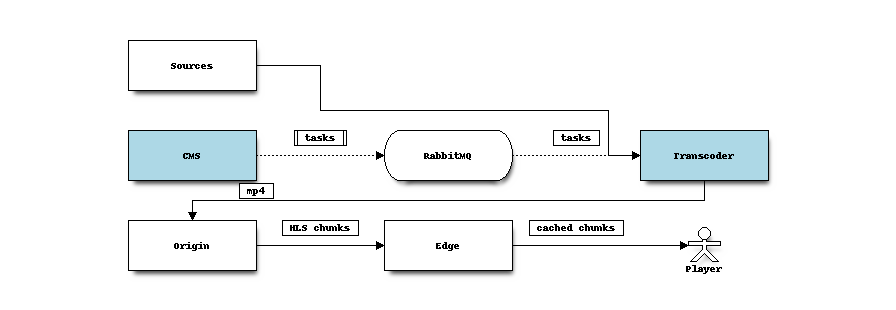
Despite django-video-transcoding affects CMS and Transcoding only, we’ll
describe full video life cycle.
Video life cycle
A new video file is uploaded to
Sourcesstorage. A link to this video file is added toCMSas a new video object.CMSsends a Celery task toRabbitMQ(celery task broker).Celery worker at
Transcoderdownloads source file fromSourcesstorage and makes anmp4file from it. Resulting file is uploaded toOrigin, which is a robust storage for transcoded video files.After that video is marked as available for clients. Depending on
CMSimplementation, video is linked with some CMS media objects like “movie” or “episode”, etc…CMSnow can provide a video stream link toPlayerPlayer requests a video stream from
Edge(a server with large disk cache and broadband network interface), usually with HLS or MPEG-Dash protocol, widely used for VOD in Internet.In case of cache miss
Edgerequests video stream fromOriginserver.Originextracts small chunks from mp4 file (i.e. with nginx-vod-module).Playerreceives next video chunk and plays it in web-browser.
Transcoding steps
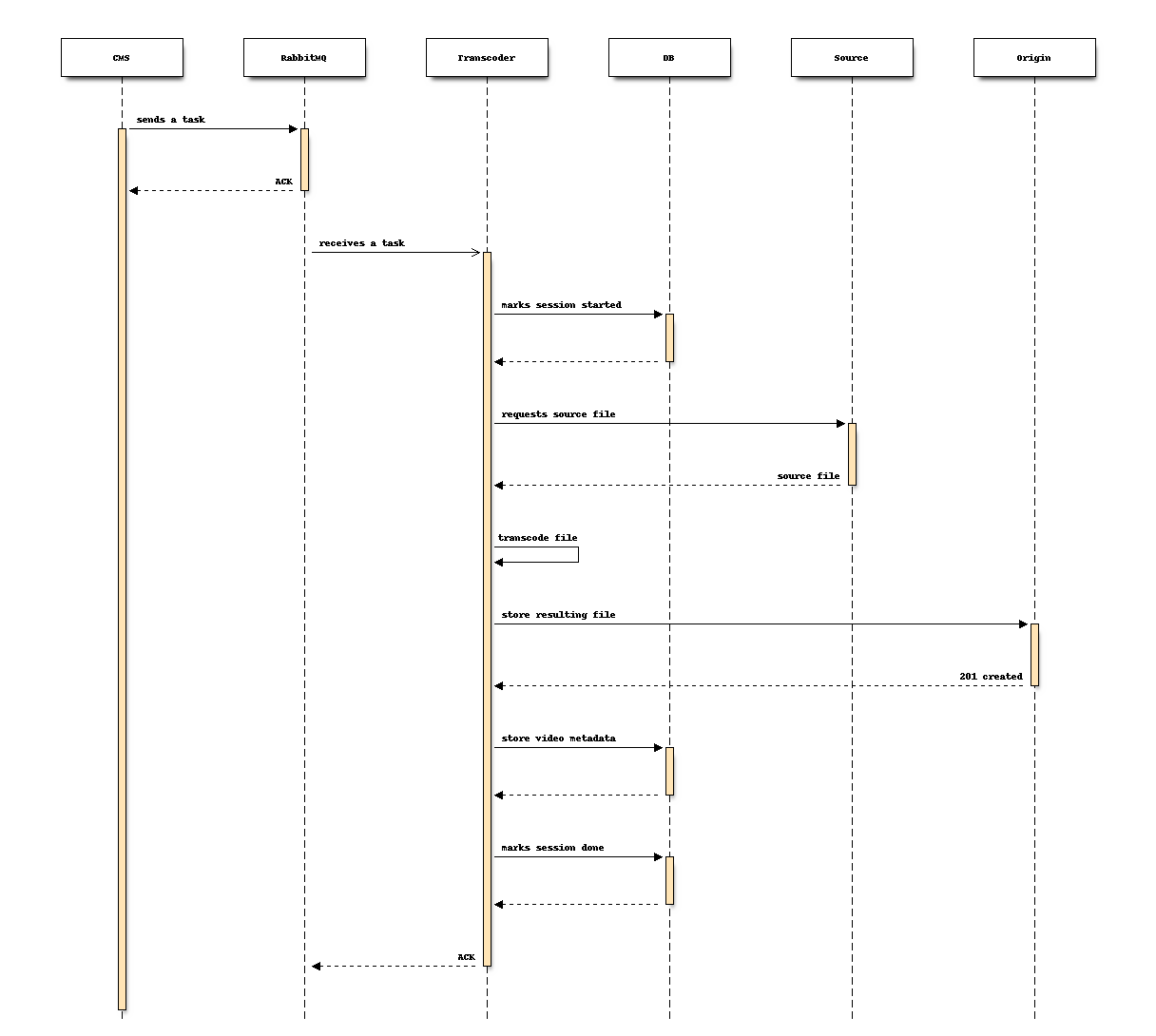
Django at
CMSputs a celery taskCelery worker at
Transcodernode changes video status and process video:download source file from
Sourcestranscodes it to a local temporary directory
upload result to
Origin
Celery worker changes video status and saves result metadata (filename, video characteristics and so on).
Load balancing
Transcoding
Transcoding video files requires lot’s of CPU power, or even GPU. ffmpeg
under the hood of django-video-transcoding utilizes all CPU cores, so every
physical host should launch single celery worker. When high transcoding
throughput is required, new physical hosts should be added. Load balancing is
done transparently as RabbitMQ clients handle messages independently.
Storage
Storing video files has some performance concerns:
Video files are large, all content may not fit to a single server.
Lot’s of disk IO is needed to handle multiple clients accessing different video files.
Files could be damaged or disappear because of disk failures.
For now, transcoding saves each video file to every origin specified in settings. This does not solve problem #1, but is easy enough. To address a problem with very large content base following should be done:
Implement
M:Nuploading strategy: store M file replicas on N serversSave origin list for video file
Change video stream link generation (choose one of origin where file exists and insert it to an edge link)
Serving video
Sending video to multiple clients is limited with:
Network bandwidth
Disk iops
CPU resources for HTTPS encryption
CPU resources needed to make chunks from mp4 files
Fault tolerance
These limitations lead to having multiple caching edge servers. Having multiple edges with disk cache is obvious enough; edge server failure is mitigated on the player side: it receives all edges list and can try each edge one-by-one.

Conclusion
Video-on-demand performance is a large and exciting topic; in some cases it
could be addressed with simple approaches, in another lot’s of work need to be
done. Despite these advices above, django-video-transcoding does not provide
universal high-performance solution; it’s purpose is simplicity and
extensibility.